Kubernetes
Jun. 5, 2022Kubernetes (often shortened to “k8s”) is a software solution which relies on containers to facilitate scaling workloads across large networks.
K8s requires specific software to be running on every node of a network, and strives to maintain a given demand by automatically scaling to demand, and recovering from application issues (healing).
The goal is to tell the network what you want to run, and let it decide where and how (unless specific directions are given). Workloads can be automatically migrated whenever some nodes encounter issues or need maintenance, and workloads can also be scaled up or down with no need to focus on where precisely the changes occur. More machines can be added or removed from the network while the job continues to get done transparently.
Developer considerations
Applications might need to be developped with K8s in mind in order to truly leverage the scaling capabilities offered.
This might include being able to load files from distributed systems (say, a S3 bucket or a remote DB instead of the local filesystem) and handling chunks rather than the whole (often leveraging messaging and queueing systems to decide what subset of the data needs to be processed). Applications also need to run inside containers, so being familiar with something like Docker really helps, especially to be comfortable separating the app into containers that are robust on their own and not dependent on each others.
See the Kubernetes blog for design considerations, as well as DigitalOcean’s article about Architecting apps for Kubernetes and RedHat’s top Design Patterns for this use case.
If you are a developer and you want applications that scale, quite a bit of learning might be required. A certification to aim for in that case would be the CKAD (Certified Kubernetes Application Developer) which focuses on giving developers the necessary information to conceptualize Kubernetes networks as a tool to run applications at scale. I cannot recommend enough Mumshad’s courses and labs on Udemy towards that goal.
Components
Ref: K8s components
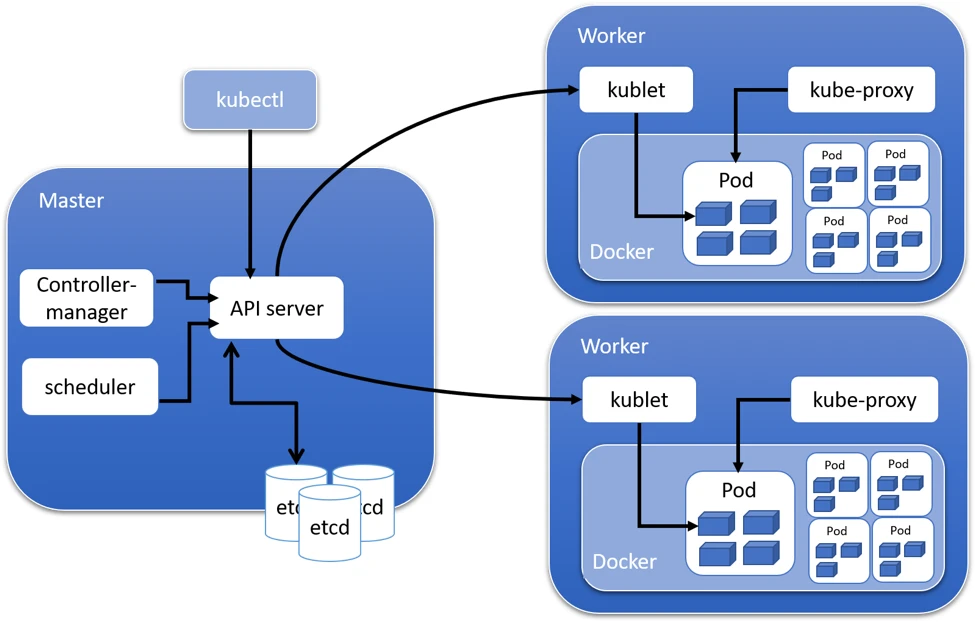
A network is comprised of one or more Master nodes (called the Control Plane), and any amount of Worker nodes.
Master nodes need to run a few different services to store the state of the network (encrypted) and decide on node and workload scheduling.
Worker nodes need to run software components which receive orders from master nodes, maintain proper networking with them, and interact with container runtimes to start/stop the apps.
All nodes which run workloads need a container runtime (a way to support running containers) such as Docker or LXC. When a node runs a workload, that workload is called a pod.
A node might run any amount of pods, depending on the size of the workload, allocations and limits, and the rest of the network.
How and where the workloads run into pods, and how pods are managed, is what Kubernetes is all about.
DevOps considerations
It is worth noting that k8s alone does not replace the need to maintain networks of nodes (often virtual machines, or VMs) at the most basic level (networking, OS, and maintenance or upgrade of Kubernetes’ software components). This is where managed solutions do a lot of the work for you (examples include Google’s Kubernetes Engine, DigitalOcean’s Kubernetes, Amazon’s EKS, Azure’s AKS).
In comparison, an in-house kubernetes requires managing master nodes carefully:
- an ETCD cluster runs across master nodes in order to retain key-value pairs that document the internal state of the Kubernetes network, and most often this cluster will have an entire encryption scheme around it (a certificate authority, SSL encryption, etc)
- a controller manager which continually monitors system state and produces the commands to bring it into conformity (runs as a Linux service which needs to be healthy)
- a scheduler decides where workloads run based on preferences and resources available (runs as a Linux service which needs to be healthy)
- an API server, which is primary interface with the network, as it interprets commands (from users or other nodes) and talks to other components (runs as a Linux service which needs to be healthy)
On top of that, worker nodes need to:
- ensure proper networking across nodes (i.e. they see each others) as well as a working kube-proxy component (typically relies in
iptablesto create a network between all nodes) - have a kubelet application if running workloads (runs as a stand-alone app which also needs to be up-to-date, and handles on its node the management of workload requests and the management of containers)
All of the nodes also need to:
- have all kubernetes components that share the same version (k8s networks rely on all components matching pretty closely, and a dedicated article exists for details on version skewing)
- see each others properly in terms of networking (which might be easier said than done!)
All of this amounts to a lot of work, which is why managed solutions might offer you a certain freedom in guaranteeing things like networking, encryption, and services being up to date, so that you can then focus on simply dictating the rules of the network in terms of workload and resource allocation/limits.
Finally, the DevOps user needs to have a CLI app called kubectl which translates CLI commands into API requests (not strictly necessary, but you might get tired of making long curl calls when kubectl get nodes does the job for you). Most of the requests towards Kubernetes infrastructures will be in the form of kubectl inputs going forward.
(TBD: ASAP) I will dive further into the software components and Kubernetes’ usage.
If you want to properly learn a LOT, I strongly recommend you attempt to pass the CKA (Certified Kubernetes Administrator), which is extremely well covered in this Udemy course and labs by Mumshad here. That’s how I got certified myself.